Showing posts with label MTC Monday. Show all posts

Friday, July 31, 2015

25 Days of Christmas in July Cut File Freebies! Day 25


Freebies are for a "Limited Time"!

Files come in both MTC (Make The Cut) & SVG (Scalable Vector Graphic) Formats in a compressed Zip File with a Picture in JPEG format, which is simply a "screen Shot of the "cut File" with th e background removed, no guarantees of how "printable" the jpegs are.

They are in a compressed zipped file and when extracted there is a file in MTC (Make The Cut) and SVG (Scalable Vector Graphic) Formats. You need an electronic die cut machine with software that can read/open either an MTC or SVG format file.


SORRY FREEBIE HAS EXPIRED
Check my Etsy Shop


Until Tommorrow...
Happy Cutting!
TTFN The Scrapoholic aka Jill

Thursday, July 30, 2015

25 Days of Christmas in July Cut File Freebies! Day 24


Freebies are for a "Limited Time"!

Files come in both MTC (Make The Cut) & SVG (Scalable Vector Graphic) Formats in a compressed Zip File with a Picture in JPEG format, which is simply a "screen Shot of the "cut File" with th e background removed, no guarantees of how "printable" the jpegs are.

They are in a compressed zipped file and when extracted there is a file in MTC (Make The Cut) and SVG (Scalable Vector Graphic) Formats. You need an electronic die cut machine with software that can read/open either an MTC or SVG format file.


SORRY FREEBIE HAS EXPIRED
Check my Etsy Shop


Until Tommorrow...
Happy Cutting!
TTFN The Scrapoholic aka Jill

Wednesday, July 29, 2015

25 Days of Christmas in July Cut File Freebies! Day 23


Freebies are for a "Limited Time"!

Files come in both MTC (Make The Cut) & SVG (Scalable Vector Graphic) Formats in a compressed Zip File with a Picture in JPEG format, which is simply a "screen Shot of the "cut File" with th e background removed, no guarantees of how "printable" the jpegs are.

They are in a compressed zipped file and when extracted there is a file in MTC (Make The Cut) and SVG (Scalable Vector Graphic) Formats. You need an electronic die cut machine with software that can read/open either an MTC or SVG format file.


SORRY FREEBIE HAS EXPIRED
Check my Etsy Shop


Until Tommorrow...
Happy Cutting!
TTFN The Scrapoholic aka Jill

Tuesday, July 28, 2015

25 Days of Christmas in July Cut File Freebies! Day 22


Freebies are for a "Limited Time"!

Files come in both MTC (Make The Cut) & SVG (Scalable Vector Graphic) Formats in a compressed Zip File with a Picture in JPEG format, which is simply a "screen Shot of the "cut File" with th e background removed, no guarantees of how "printable" the jpegs are.

They are in a compressed zipped file and when extracted there is a file in MTC (Make The Cut) and SVG (Scalable Vector Graphic) Formats. You need an electronic die cut machine with software that can read/open either an MTC or SVG format file.


SORRY FREEBIE HAS EXPIRED
Check my Etsy Shop

Until Tommorrow...
Happy Cutting!
TTFN The Scrapoholic aka Jill

Monday, July 27, 2015

25 Days of Christmas in July Cut File Freebies! Day 21


Freebies are for a "Limited Time"!

Files come in both MTC (Make The Cut) & SVG (Scalable Vector Graphic) Formats in a compressed Zip File with a Picture in JPEG format, which is simply a "screen Shot of the "cut File" with th e background removed, no guarantees of how "printable" the jpegs are.

They are in a compressed zipped file and when extracted there is a file in MTC (Make The Cut) and SVG (Scalable Vector Graphic) Formats. You need an electronic die cut machine with software that can read/open either an MTC or SVG format file.


SORRY FREEBIE HAS EXPIRED
Check my Etsy Shop


Until Tommorrow...
Happy Cutting!
TTFN The Scrapoholic aka Jill

Sunday, July 26, 2015

25 Days of Christmas in July Cut File Freebies! Day 20


Freebies are for a "Limited Time"!

Files come in both MTC (Make The Cut) & SVG (Scalable Vector Graphic) Formats in a compressed Zip File with a Picture in JPEG format, which is simply a "screen Shot of the "cut File" with th e background removed, no guarantees of how "printable" the jpegs are.

They are in a compressed zipped file and when extracted there is a file in MTC (Make The Cut) and SVG (Scalable Vector Graphic) Formats. You need an electronic die cut machine with software that can read/open either an MTC or SVG format file.


SORRY FREEBIE HAS EXPIRED
Check my Etsy Shop

Until Tommorrow...
Happy Cutting!
TTFN The Scrapoholic aka Jill

Monday, October 31, 2011

MTC/SVG Monday

Good Monday Morning, afternoon, evening! 

Today I have a cute and Simple Christmas File for you in preparation for the upcoming Holiday Season! I can't believe tomorrow is Nov. 1st. Oct. kept me busy with all my evaluation appts. with all the Doctors, and therapists. This next month will be just as busy since i will be starting physical therapy along with pool therapy (each 2 days a week), home PT and neuro-psychologist therapy, (twice a month. On top of that if you saw yesterdays post, I am hosting a 30 Day Handmade Gift making Hop, which will be easy since its going to be all pre-scheduled posts. I am also, hoping to add 30 days of Christmas Cards since I've made 30 different styles to put in my etsy and/or zibbet shop and a few for myself to mail to family and friends. I am debating on adding in 30 Days of MTC/SVG Files, not sure if I have enough made or I may hold of until Dec for that one so its not too much in one month. So, depending on which way I decide there maybe a file each day or there maybe none at all for the whole month, since I would be saving them for next month to post. Check back tomorrow either way for the start of the Hop and Christmas Cards, I promise you won't be disappointed :)

For today's Free File:
Candy Cane


Freebies expire after awhile and are removed as a Free download.


Sorry Freebie Has Expired

Check For $ale Tab or My Etsy Store for Possible Purchase


Until Next Time...
Happy Cutting!
TTFN Jill aka The Scrapoholic

Monday, October 17, 2011

MTC/SVG Monday

Good Afternoon, sorry I forgot to get my post ready early and scheduled. I was a bit pre-occupied with my dr. appt. I had today. I had an injection, known as a nerve block, which I have had done before and not so successful. Never mind the fact that my original injury was caused by an injection and creating a complete and utter fear of needles. Though, I am home and the procedure is done and went well w/out any issues and not feeling any undue pain like the last one. Time will tell if it works, as of right this minute my arm feels great from the lidocaine but that will be wearing off soon :(  but hopefully the other meds he injected will kick in and it will do its job for hopefully for a least a week, a month would be wonderful, a couple months would be better but I'm keeping my expectations low.  However, my files for today I hope meet your expectations!

Meet the cute and furry or not so furry Halloween Monsters, Which don't necessarily need to be used just for Halloween as they are generic but absolutely adorable (i think anyways). For the .zip file which contains both the MTC and SVG Files in the one and a color picture of the monsters is just $2 for all 7 of the silly cute monsters. (most other sites charge $1 up to $4 for just one character).


Check For $ale Tab or My Etsy Store for Possible Purchase


MTC is all in one file and each layer is a different color
SVG is in several files in order to fit all the pieces and there is a color Picture which hopefully helps for the different layers. 

I wish I knew how to export from Make the Cut to a SVG file in color and in the multi layer like MTC does?
Is that possible or does SVG files just not work that way?

DESIGN TEAM INSPIRATION

Please head over to the Design Team Blogs and see more on their awesome inspirational work. They work just as hard on their projects as I do on making the files and I know the'd love some lovin'.  Even if you just checked one of the boxes under their posts about how you feel. It only takes a minute to put a smile on someone's face.  Thanks


Thanks!

Until Next Time...
...Happy Crafting
TTFN Jill

Monday, October 3, 2011

MTC/SVG Monday

Today's Files are more for "Signs" Halloween ones though :) 
but I'm sure with the craftiness they could be made into other things too!


Design Team Inspiration


Please head over to the Design Team Blogs and see more on their awesome inspirational work. They work just as hard on their projects as I do on making the files and I know the'd love some lovin'.  Even if you just checked one of the boxes under their posts about how you feel. It only takes a minute to put a smile on someone's face.  Thanks


I have put all the files into a ZIP format file contains all of the images in MTC, SVG, EPS/AI File Formats.

Freebies expire after awhile and are removed as a Free download.

Sorry Freebie Has Expired

Check For $ale Tab or My Etsy Store for Possible Purchase


Until Next Time...
Happy Cutting!
TTFN Jill aka The Scrapoholic

Wednesday, September 28, 2011

MTC/SVG Monday ~ even though its Wednesday!

Better late than never right? I do apologize for this not posting on Monday, I never finished uploading the pictures cause blogger was being a booger and I had an early appt. at the pain clinic, which we later found out was the a rehabilitation clinic, wrong place but had went thru the whole examination and telling the whole story and of course these doctors always have to check my reflexes and needless to say I am still recovering and it took everything for my husband not to get out the chair and do who knows what to the Doctor. But hopefully at the right Pain Clinic they will listen and I'll be better by then which is Oct. 10th.


Since I just LOVE Halloween and Disney I have a few more Images for you. These images are copyright and owned by Disney, I just simply colored them and made cut files out of them but Disney is the sole ownership of the original images.  If you do open the MTC files you will need to have the updated version of MTC, I must have opened them to check them and saved them in the newer version. I usually double check the files are complete and ready to share before uploading. I have the info below of the Updated version below. If you have SCAL or use the SVG files you won't need to worry.

MTC Update! 4.0.2 Beta Download Version 4.0.2: Click Here.


The Cut Files for this week are:
Disney HalloweenTime Files :)
Please Don't share my files, please send people here to my blog for the links. Thank you

Minnie and Mickey behind the pumpkin

Pirate Mickey


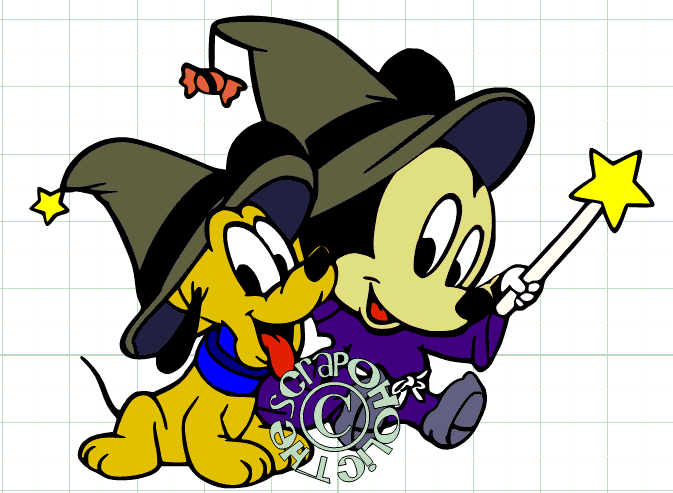
Mickey and Pluto as witches

Minnie as a Witch

I have put all the files into a ZIP format file contains all of the images in MTC, SVG, EPS/AI File Formats.
Freebies expire after awhile and are removed as a Free download.

Sorry Freebie Has Expired

Check For $ale Tab or My Etsy Store for Possible Purchase


If you enjoy my files and would like to make a donation for my hard work and time, I'd greatly appreciate it, just click the paypal button below or on my side bar. If you can't afford anything at this time, I understand that too, but it would be greatly appreciated if you left a simple "Thanks" in the comment section. 

Donation button


 Until Next Time...
Happy Cutting!
TTFN Jill aka The Scrapoholic


Monday, September 19, 2011

MTC/SVG Monday

I've been slacking a bit on my every Monday getting a file out. This summer has not been much fun. Things are slowly settling down but still lots going on. Since my external hard Drive is still waiting to be fixed :(  which holds all my files and my other computer crashed and no longer has all my files. I've had to start from scratch. I am lucky that I have many older files stored online, the ones I have for sale. In any case, I have been playing around a bit in MTC and one set of files I have been dilagently working on still needs work they are being lil buggers but Since I just LOVE halloween I found some great Disney Images for you. These images are copyright and owned by Disney, I just simply colored them and made cut files out of them but Disney is the sole ownership of the original images.  If you do open the MTC files you will need to have the updated version of MTC, I must have opened them to check them and saved them in the newer version. I usually double check the files are complete and ready to share before uploading. I have the info below of the Updated version below. If you have SCAL or use the SVG files you won't need to worry.

MTC Update! 4.0.2 Beta

MTC is improving again! I just LOVE MTC!

Custom Mat Sizes
- Add custom mat size from the Mat Size combo box.
- Remove custom mat size by selecting mat then hitting delete key.
- No more "Please Wait... Rendering Mat" messages. Mats render extremely fast.
- Zoom from 10% all the way up to 1000% in a split second.
- Ctrl+Mouse-Wheel zoom now zooms centered.
- Create any size mat with custom Margins/No Cut Zones.
- Dark Blue mat has been replaced with Purple. Pink mat colors updated.
- Option to hide/show No-Cut-Zone margins.

Multi-Layered Conical Warp
- Create multiple layered/colored conical warps -- preview in color in un/rolled view.

Texture Sizing Simplified
- Holding your shift-key while sizing a shape from the corners will scale the textures properly.
- "Scale Paths" option added to the Select Texture dialog's Scale option.

Fuse-N-Weld Updated
- Completly rewritten
- Allows for customizable tolerance
- Note: Make sure to join the segments together before fusing them

Node Editing Tools
- Toggle tools by hitting the 'W' key, View>>Node Mode or clicking the Node icon in the upper right-hand of mat.
- Node Edit Tool: Edit line segments, Bezier segments, Bezier control points, Bezier/Line paths, insert/delete nodes, etc. (be sure to use right-click menu)
- Basic Shape Tool: Add basic shapes by clicking and dragging
- Bezier Draw Tool: Draw Bezier curves (Fat Path option included)
- Freehand Line Draw Tool: Draw freehand lines. Hold CTRL key to draw straight lines (Fat Path option included)
- Measure Tool: Measuring tape and protractor.
- Eraser Tool: Erase parts of paths easily (Inverse eraser option included)
- Knife Tool: Slice and dice paths.
- Select tools using hotkeys: F1-F8

Other:
Raster Image File Dialog Paste Button: Copy and paste images from Windows Explorer.
Reverse Paths option added to Advanced
Welding of Open Paths fixed
Simplifiying of Open Paths fixed
EPS importing fixed for certain files
MANY, MANY bug fixes.

4.0.1 Update:


Fixes crash when closing out a single project after node-mode was enabled.
All knot keywords have been replaced with the node keyword.


4.0.2 Update:


Fixes more crashes when closing out projects after node-mode was enabled.
Arrow keys now nudge line segments (Ctrl+arrow keys does a nudge X 20).
Clipboard fixes.

Download Version 4.0.2: Click Here.

~~~~~~~~~~~~~~~~~~~~~~~~~~~~~~~~~~~~~~~~~


The Cut Files for this week are:
Disney HalloweenTime Files :)
Please Don't share my files, please send people here to my blog for the links. Thank you

Minnie and Mickey behind the pumpkin


Pirate Mickey


Mickey Pumpkin
Freebies expire after awhile and are removed as a Free download.

Sorry Freebie Has Expired

Check For $ale Tab or My Etsy Store for Possible Purchase


Design Team Inspiration


If you enjoy the Design Team Inspiration, please stop by thier blogs by clicking thier names under their projects photos and leave them some kind words. If you enjoy my files and would like to make a donation for my hard work and time, I'd greatly appreciate it, just click the paypal button below or on my side bar. If you can't afford anything at this time, I understand that too, but it would be greatly appreciated if you left a simple "Thanks" in the comment section.

Donation button


Until Next Time...
Happy Crafting
TTFN Jill aka The Scrapoholic

Tuesday, September 13, 2011

MTC Update! 4.0.2 Beta

MTC is improving again! I just LOVE MTC!

Custom Mat Sizes
- Add custom mat size from the Mat Size combo box.
- Remove custom mat size by selecting mat then hitting delete key.
- No more "Please Wait... Rendering Mat" messages. Mats render extremely fast.
- Zoom from 10% all the way up to 1000% in a split second.
- Ctrl+Mouse-Wheel zoom now zooms centered.
- Create any size mat with custom Margins/No Cut Zones.
- Dark Blue mat has been replaced with Purple. Pink mat colors updated.
- Option to hide/show No-Cut-Zone margins.

Multi-Layered Conical Warp
- Create multiple layered/colored conical warps -- preview in color in un/rolled view.

Texture Sizing Simplified
- Holding your shift-key while sizing a shape from the corners will scale the textures properly.
- "Scale Paths" option added to the Select Texture dialog's Scale option.

Fuse-N-Weld Updated
- Completly rewritten
- Allows for customizable tolerance
- Note: Make sure to join the segments together before fusing them

Node Editing Tools
- Toggle tools by hitting the 'W' key, View>>Node Mode or clicking the Node icon in the upper right-hand of mat.
- Node Edit Tool: Edit line segments, Bezier segments, Bezier control points, Bezier/Line paths, insert/delete nodes, etc. (be sure to use right-click menu)
- Basic Shape Tool: Add basic shapes by clicking and dragging
- Bezier Draw Tool: Draw Bezier curves (Fat Path option included)
- Freehand Line Draw Tool: Draw freehand lines. Hold CTRL key to draw straight lines (Fat Path option included)
- Measure Tool: Measuring tape and protractor.
- Eraser Tool: Erase parts of paths easily (Inverse eraser option included)
- Knife Tool: Slice and dice paths.
- Select tools using hotkeys: F1-F8

Other:
Raster Image File Dialog Paste Button: Copy and paste images from Windows Explorer.
Reverse Paths option added to Advanced
Welding of Open Paths fixed
Simplifiying of Open Paths fixed
EPS importing fixed for certain files
MANY, MANY bug fixes.

4.0.1 Update:


Fixes crash when closing out a single project after node-mode was enabled.
All knot keywords have been replaced with the node keyword.

4.0.2 Update:


Fixes more crashes when closing out projects after node-mode was enabled.
Arrow keys now nudge line segments (Ctrl+arrow keys does a nudge X 20).
Clipboard fixes.

Download Version 4.0.2: Click Here.

Thanks to Bryan for all the help.

Thanks to Ann for all the patience.

Thanks to www.letteringdelights.com for helping with the new UI icons.

And thanks to YOU for being a fan. We appreciate it.

We will be talking about 4.0 on the Tuesday webinar.

-andy.


~~~~~~~~~~~~~~~~~~~~~~~~~~~~~~~~~~~~~~~~~


I just downloaded it myself and haven't had a chance to play with it yet! I am excited to try some stuff out. I like the new lines inside the inch squares, that will help me alot! :)


Until Next Time...
Happy crafting!
TTFN Jill (aka The Scrapoholic)

01 09 10